We Tested It Against 1,800 Scams. A Picture Got Through.
Everything we built assumed a scam would arrive as words. One arrived as a JPEG, scored low, and taught us more about AI and fraud than any of the clever attacks did.
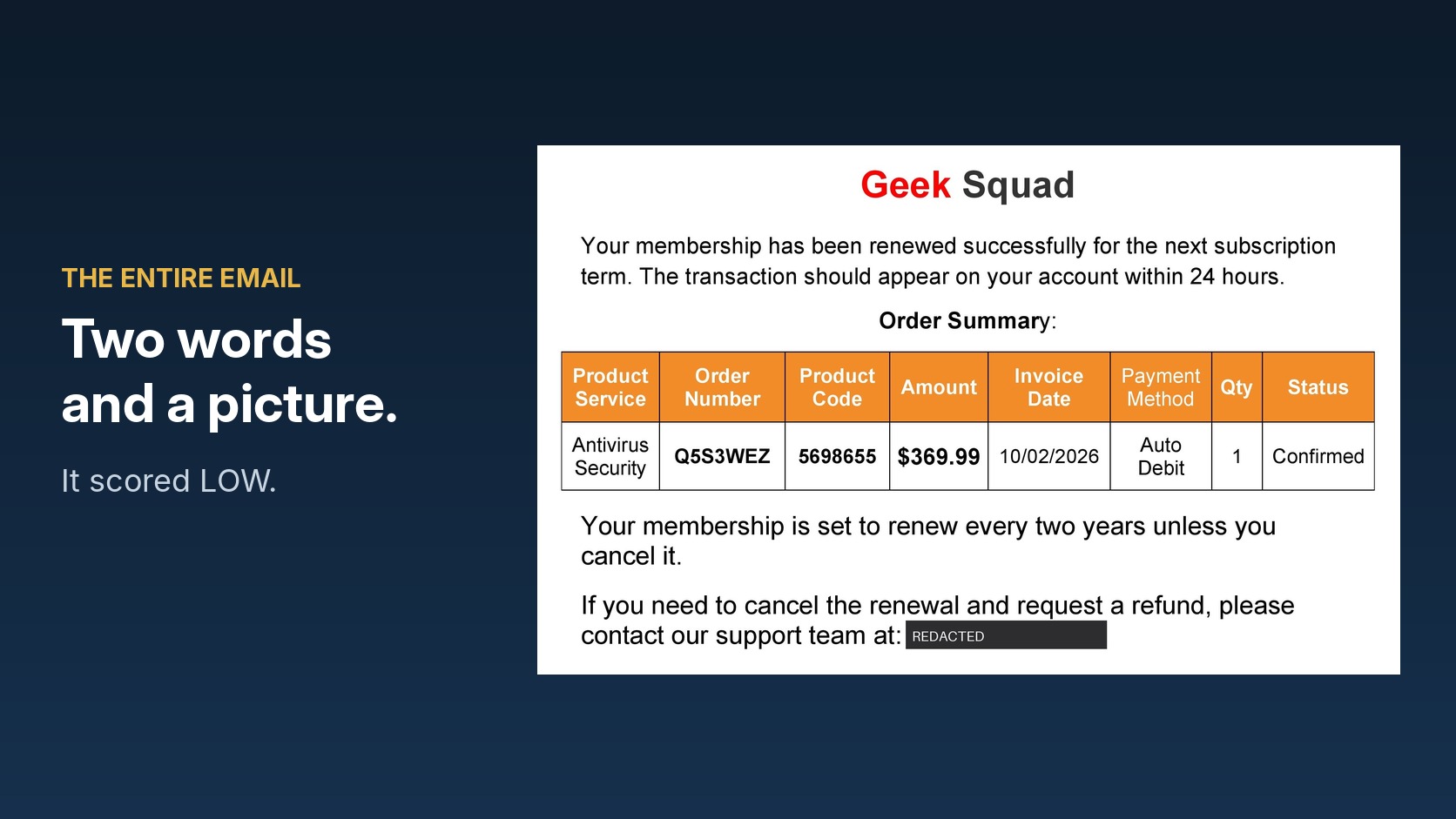
Last week a Geek Squad renewal notice landed in a mailbox we monitor. Subject line "Renewal no-7575678," sent from a throwaway Gmail address. The body of the email was two words: "Thank you."
Everything else was a picture. One 416 KB image, pasted inline, showing a $369.99 auto-renewal and a number to call if you wanted to cancel it. No link to scan, no attachment to open, no text to read.
Our detector scored it LOW.
I want to walk through why, because the answer is not what people expect when they ask how AI is changing fraud, and because the same gap is sitting in whatever is filtering mail for your business right now.
The scam had no AI in it at all
There is a version of this conversation that everybody has already had. Language models write clean English, so the old advice about typos and broken grammar is finished, and scam emails now read like they came from your bank because in a sense they did. All true, and all of it is about the surface of the message.
The message that beat us went the other direction entirely. Somebody took a screenshot of their own scam and sent the screenshot. That is the cheapest evasion available, it requires no technology beyond a phone, and it worked because our pipeline read words and there were no words.
This is the part worth sitting with if you are buying security tools. The thing that got through was not sophisticated. It exploited an assumption, and assumptions are cheap to find and cheap to attack.
Why none of our tests caught it
We check the detector against about 1,800 cases before anything ships. Text message scams, email scams, prompt injection attempts, a holdout set the tuning never sees, a seed set that has to come back clean every single time. It is a serious gate and it has caught real regressions.
Every one of those cases was typed-out text.
Not one had an image. Not one had a PDF. Not one had a real HTML email body with the mess that actual mail carries. So on September 4, when we changed how the system decides whether an inline image is part of a message or just page furniture, the change was invisible to every gate we had. All 1,800 cases passed, because none of them could tell the difference.
Of the 165 real forwarded messages we keep for replay, four have that shape, a picture carrying the whole message. Three arrived before the September change and were read correctly. The one that arrived after was not.
Your controls are only tested against the attacks you already imagined. That is the finding, and it generalizes well past our product. If your phishing simulation program sends text emails with links in them, you have evidence about text emails with links in them. You do not have evidence about the quarterly invoice that arrives as a scanned image, which is exactly how a lot of real invoice fraud travels.
What AI actually changed, and what it left alone
Language models improved the wrapper. Grammar, formatting, tone, the ability to sound like a specific company or a specific person. That is real and it retired a generation of advice.
What a model cannot do is remove the ask. A scam has to get something out of you, so somewhere in it there is a request for money, a credential, a code read out loud, or a move onto a phone call where nobody is logging anything. It needs urgency, because a person who sleeps on it does not pay. Those parts are structural. Polish them all you like and they are still there, because without them there is no scam.
That is why we score the way we do. The model reads the message and labels the manipulation tactics in it from a fixed list it is not allowed to add to, with a quote from the message wherever one fits. A grounding check throws out any tactic the words do not actually support. Then a deterministic rule set decides the verdict. The model never gets to decide, and it is never permitted to tell anyone they are safe.
The tells that died were cosmetic. The ones that survived are structural. Build toward the second kind.
Then our own model made it worse
The fix for the picture problem seemed obvious. Read the image, pull out the text, score the text.
We tested it against a set that included images with no text in them at all, because real mail is full of logos and signatures and family photos. Asked to return nothing for a text-free image, the model described it instead. "I can see this image appears to be mostly noise." Four times out of four.
That description then became, as far as the rest of the system was concerned, the words in the image. A family photo counted as a message we had successfully read. On one genuine email the description was close enough to suspicious that it tripped our prompt-injection warning, which exists to catch messages written to fool automated checkers. We were flagging a real person's photo because our own model narrated it.
Rewriting the reader to return a structured answer, a yes-or-no on whether there was text plus the text itself, dropped that false warning from three of our real forwards to one.
A language model would rather say something than say nothing. If you are evaluating anything described as AI-powered, that is a specific question worth asking the vendor: what does your model do when the honest answer is "I cannot tell"? Silence is a behavior that has to be designed in, and it usually is not.
The rule we wrote afterward
When the system cannot read something, it now says so, and the verdict floors at MEDIUM. Not LOW. An image we could not open, a file we could not parse, a message with almost no readable text, all of it now produces an explicit "we could not see this" rather than a clean bill of health.
That sounds small. It is the single most useful thing in the release, because it converts a silent failure into a visible one. The old behavior told you a scam was LOW risk. The new behavior tells you nobody looked.
I would extend that to how you buy. Any tool that returns "safe" is making a claim about something it examined. Ask what happens when it did not examine anything.
And when your employee forwards it to you, the evidence is usually gone
One more finding, because it is the most immediately useful thing here and no one seems to publish it.
We measured 91 real forwarded emails to see what actually survives the trip. The published guidance from Microsoft and from the anti-phishing industry says forward as an attachment so the routing headers survive. That is correct and it is nowhere near specific enough, because what your staff actually produce depends on which client they used.
Two thirds of those forwards, 61 of 91, arrived forensically untraceable. The authentication results, the SPF and DKIM and DMARC outcomes that tell you whether the sender was really who they claimed, were present on four. Four out of ninety-one.
We ran the same message through two clients nine minutes apart. Outlook on a phone produced nine of the original headers. Outlook on a PC produced sixty-five. One mobile export dropped the entire plain-text version of the message and trimmed the HTML, so the analyzer received 2,148 characters of a 12,852 character email, an 83% loss. A signal that should have fired did not fire, because the words it keys on were never delivered.
So when you tell your team to send suspicious mail to IT, tell them how. From a desktop client, forwarded as an attachment. Otherwise you are investigating a photocopy of a photocopy, and the thing you most need, the proof of who really sent it, is the first thing to go.
Where I land
The interesting attacks are not the clever ones. In testing this thing against roughly 1,800 scams, the cases that beat us were mundane almost every time, a picture sent instead of text, a forward that lost its headers on the way, a model that talked when it should have stayed quiet.
AI raised the floor on how convincing a scam looks, and it did not change what a scam has to do to work. The gap in your defenses is probably not where an attacker was smartest. It is where your testing and your imagination stopped at the same place.
Go look at what your mail filtering does with an image-only message. I would genuinely like to know what you find.